

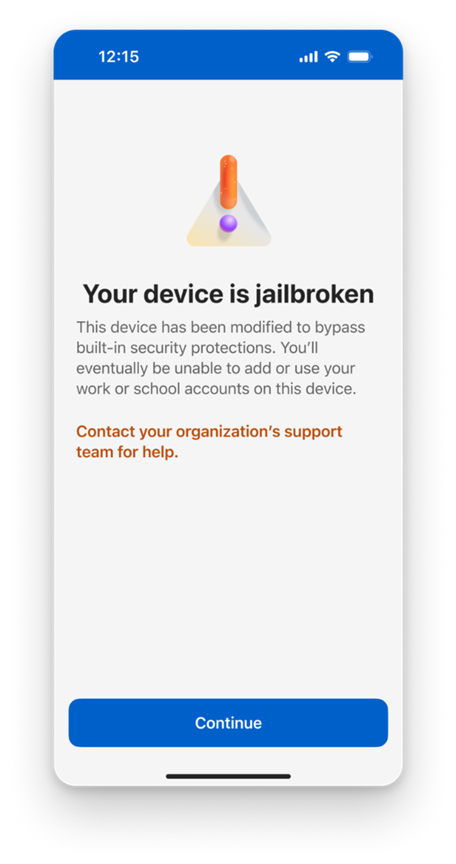
Microsoft’s Authenticator app just added a new security bump—rooted Androids and jailbroken iPhones will no longer see the app as a trusted device. In a move aimed at tightening the company’s zero‑trust policy, the update will lock out any phone that has been tampered with at the operating‑system level.
Why the Sudden Shift?
Rooting and jailbreaking strip away built‑in security layers, giving attackers a playground to inject malicious code. Microsoft’s latest patch addresses the risk that compromised devices could bypass multi‑factor authentication (MFA) and hijack corporate or personal accounts.
Key points:
- Zero‑Trust Assurance – only devices verified by Microsoft’s security framework can run Authenticator.
- Rooting or jailbreaking strips system integrity checks that Authenticator relies on.
- Potential account lockouts if you’re using a modified device for MFA.
Who’s Affected?
Any user who has recently updated the Authenticator app to the latest version and whose phone is rooted or jailbroken will notice the service refuse to work.
Common scenarios:
- Tech enthusiasts who tweak Android ROMs for speed or custom UI.
- Developers who jailbreak iOS for open‑source testing.
- Customers who use newer Android 14 or iOS 18 and install custom recoveries.
How to Verify Your Device
Checking whether your phone is rooted or jailbroken is quick. Follow these steps:
- Open Microsoft Authenticator.
- Navigate to Settings > Device Security.
- Look for a warning banner that reads “Device rooted or jailbroken.”
Alternatively, use a third‑party tool like Root Checker (Android) or Checkra1n (iOS) to confirm the device status.
What to Do Next
If your device is flagged, you have a few options:
- Re‑install the original OS via factory reset.
- Switch to a non‑modified phone for MFA.
- Contact your organization’s IT to request an alternative authentication method.
For businesses, Microsoft recommends rolling out a policy that blocks rooted or jailbroken devices from accessing corporate resources via MFA.
Impact on Users and Businesses
While the change may feel restrictive, it protects millions from credential theft. Companies that rely on Microsoft 365 and Azure Active Directory see a direct reduction in MFA bypass attempts.
Potential drawbacks include:
- Disruption for users who rely on custom ROMs for accessibility features.
- Need for additional IT support to re‑enroll devices.
- Possible increase in support tickets during rollout.
Microsoft’s support team has rolled out a knowledge base article detailing the migration steps and FAQs.
Future Outlook
With the rise of sophisticated phishing and credential stuffing attacks, Microsoft is tightening its MFA controls globally. The company plans to integrate biometric verification on all non‑rooted devices and expand device health monitoring.
Stay ahead by following Microsoft’s security updates and ensuring your device stays compliant. If you’re a developer or power user, consider the trade‑offs between customizability and security.
Check your phone settings now to ensure you’re not locked out of your accounts—and keep your digital life secure.


💬 Comments
Comments
Post a Comment