

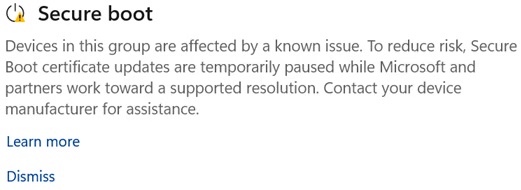
Microsoft’s latest Secure Boot update, meant to tighten Windows 11 security, has hit a snag on several PCs. The company confirmed that the certificate refresh is failing or being blocked on certain hardware configurations, prompting a temporary rollback. This post dives into why Secure Boot matters, what’sophones going wrong, and how users can track the fix.
What is Secure Boot and Why It Matters
Secure Boot is a UEFI firmware feature that verifies the integrity of the boot chain, preventing tampered or malicious code from loading before the OS starts. In Windows 11, it’s a mandatory security layer, ensuring that only signed, trusted components run at startup. A failure in this chain can expose a system to rootkits, bootkits, and other low‑level threats.
The Current Issue: Certificate Update Failures
Microsoft’s recent rollout aimed to refresh the list of trusted Secure Boot certificates. However, on some hardware, the update process stalls, leaving the system stuck on an old or corrupted certificate set. The result: the OS displays a “Secure Boot update failed” message, and the device may revert to a previous firmware state.
Key Symptoms Users Notice
- Boot loop or “Secure Boot update failed” screen during startup
- Inability to install the latest Windows 11 updates
- Unexpected firmware rollback notifications
Microsoft’s Response and Roadmap
The company has acknowledged the problem and is working with hardware partners to identify the root cause. A coordinated patch is expected in the next cumulative update cycle. In the meantime, Microsoft recommends:
- Verify firmware version: Check BIOS/UEFI version in the system settings and compare it to the latest available on the manufacturer’s site.
- Disable and re‑enable Secure Boot: Temporarily turning the feature off in UEFI, rebooting, then re‑enabling can clear cached errors.
- Manually install the certificate bundle: Advanced users can download the trusted certificate set from Microsoft’s support portal and load it via UEFI.
Follow the Windows Update history and the Windows Security Blog for official patch notes.
Potential Impact on Users and Businesses
For most consumers, the issue is a brief inconvenience—just a few extra minutes at boot. However, enterprises that rely on strict boot integrity checks could face compliance gaps. The temporary rollback may also affect systems that use third‑party firmware mods or custom BIOS builds.
How to Stay Ahead of thePole
Proactive steps can minimize downtime:
- Keep BIOS/UEFI firmware updated—most manufacturers release patches that align with Microsoft’s Secure Boot requirements.
- Enable automatic Windows updates—this ensures you receive the official fix as soon as it’s available.
- Maintain a backup of current firmware settings—use the manufacturer’s recovery tools to restore configuration if needed.
Microsoft’s prompt acknowledgment and clear guidance give users confidence that the problem is being addressed. In the evolving landscape of hardware security, staying informed and maintaining up‑to‑date firmware is your best defense.
Stay ahead—check your BIOS version, enable auto‑updates, and keep an eye on Microsoft’s rollout notes. Together, we can keep Windows 11 secure and running smoothly.


💬 Comments
Comments
Post a Comment