

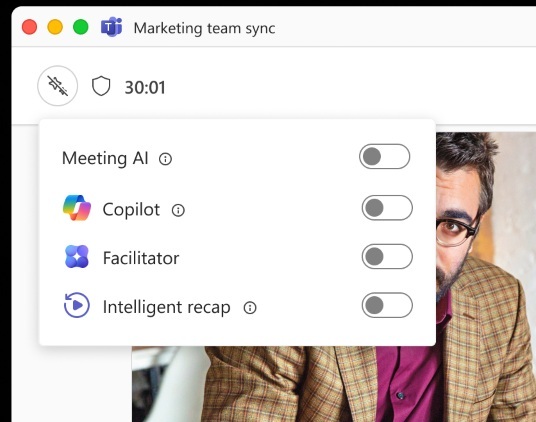
When Microsoft rolled out its AI‑powered features for Teams, many users felt the new tools were too intrusive for everyday meetings. Today, the tech giant is stepping back, giving users the power to disable Copilot, Facilitator and Recap on the fly across Windows, macOS and Linux.
Why the Backlash Happened
Early adopters complained that AI assistants sometimes intruded on conversations, misinterpreted context, or captured sensitive data. The backlash spread quickly across professional forums in the U.S., U.K. and Canada, prompting Microsoft to re‑evaluate its approach.
Microsoft's New Flexibility
After days of feedback, Microsoft announced a simple toggle that lets users mute AI functions mid‑meeting. The update applies to the Teams desktop client and the queim web app, ensuring consistent control across platforms.
What the New Controls Mean for Users
With the toggle in place, participants can now:
- Turn off Copilot – stop the AI from drafting messages or summarizing discussions.
- Disable Facilitator – remove AI prompts that guide meeting flow.
- Turn off Recap – prevent the AI from generating post‑meeting summaries.
These changes give users confidence that AI won’t kiel in on confidential topics.
How to Turn Off Copilot, Facilitator and Recap
Enabling the toggle is straightforward:
- Click the Meeting Options gear during a call.
- Find the AI Features section.
- Slide the toggle next to each feature to Off.
Once disabled, the AI icons disappear from the meeting toolbar, and the assistant stops collecting data.
Looking Ahead
Microsoft says it will keep listening to user feedback and may introduce more granular controls, such as setting AI activity limits or choosing which data the assistant can access. The company also plans to clarify its data‑handling policies, reassuring users that AI tools are designed with privacy in mind.
Stay tuned for more updates on AI in collaboration tools. Subscribe to our newsletter for the latest tech news and insider insights.


💬 Comments
Comments
Post a Comment