

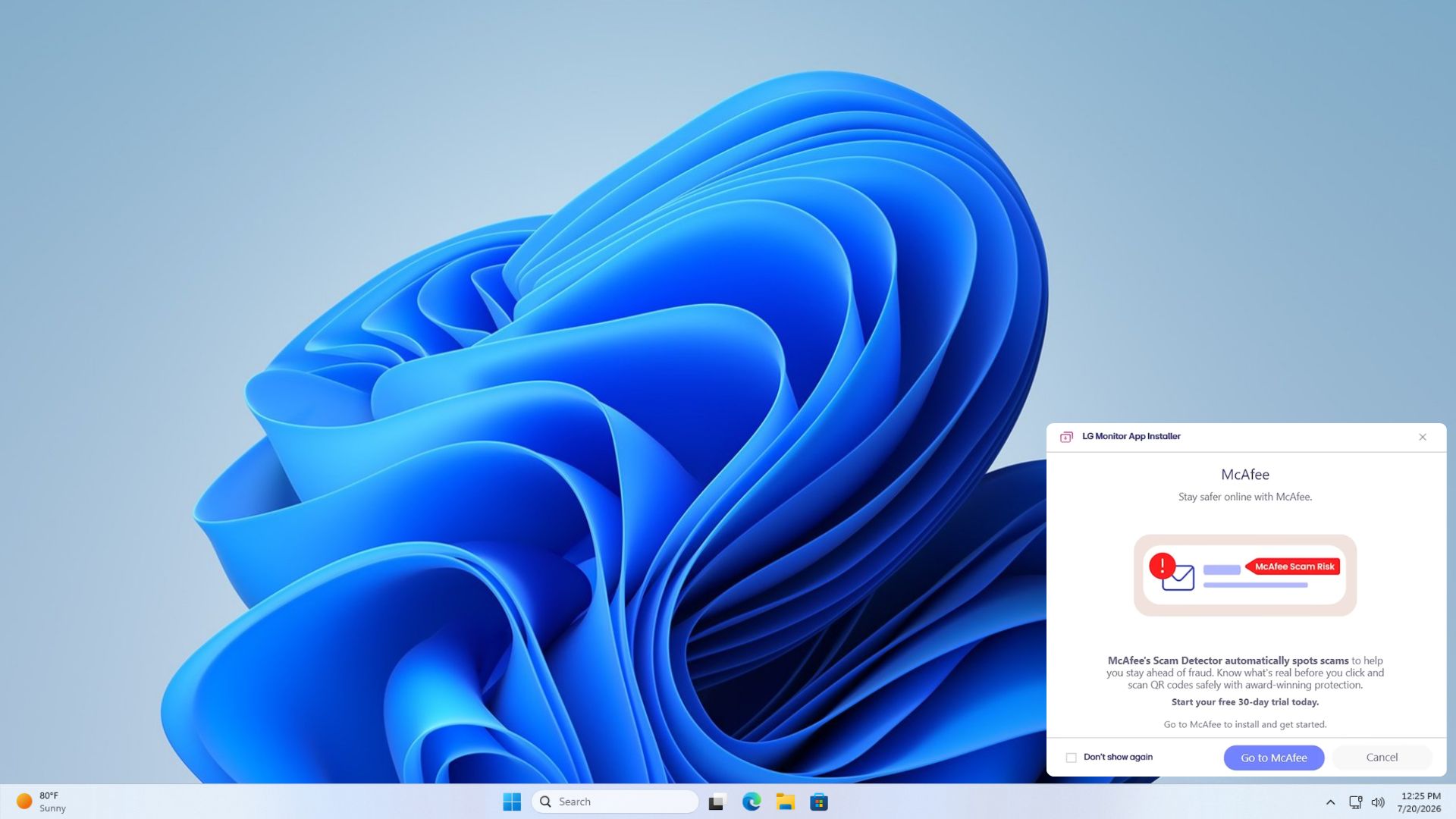
LG monitors are quietly installing a McAfee‑ad‑driven application on every Windows 11 system, triggering a silent update that shows up at each boot. The culprit is an LG‑supplied driver that hooks into Windows Update and installs a lightweight helper app with zero user consent. The app floods the desktop with pop‑ups, effectively turning each LG monitor into a mobile advertisement platform.
How the Bloatware Sneaks In
The mechanism is simple yet sinister: the LG driver registers a Windows Update catalog entry. When Windows checks for updates, the catalog appears as a legitimate feature update, and the installer runs automatically. Because the catalog is signed by LG, Microsoft’s policy engine treats it as trusted, bypassing any user prompt.
Microsoft’s Own Documentation Confirms the Flaw
Microsoft’s developer docs reveal that the update engine was designed, since Windows 8, to skip consent for certain “hardware‑related” updates. The intention was to streamline driver rollouts, but the policy was never intended for adware. LG’s engineers exploited this loophole, turning a legitimate feature into a covert advertising channel.
Key Features of the Hidden App
- Automatic Launch: Starts on every boot without user interaction.
- Ad Injection: Displays McAfee promotional content in full‑screen pop‑ups.
- Stealth Mode: Operates with a low system footprint, making it hard to detect.
- Update Loop: Reinstalls itself via Windows Update if removed.
Why Apple’s macOS Never Faced This
Apple’s macOS architecture enforces explicit user consent for any software that modifies system components. The macOS App Store and Gatekeeper require user approval before installing background services, preventing a scenario like LG’s. This contrast highlights the differing security models between the two ecosystems.
Impact on Users Across North America
Incidents have been reported in the United States, Canada, and the United Kingdom. Users experience intrusive pop‑ups, reduced system performance, and a feeling of lost control. The issue surfaces most visibly when a new LG monitor is connected, but it persists even after the device is disconnected.
Microsoft’s Response
Microsoft has acknowledged the problem in an internal advisory, noting that the update mechanism is “vulnerable to abuse” when third‑party vendors sign updates. The company plans to revise its policy to require explicit user consent for future hardware updates, but the rollout timeline remains unclear.
Siya’s Recommendations for Users
Users should keep their systems patched with the latest Windows Defender updates and run the latest Microsoft Security Essentials scan. If you own an LG monitor, consider disabling the automatic update for LG drivers through the Device Manager. Finally, monitor Xenon’s Device Update History for any unfamiliar entries.
What This Means for the Future of Hardware Updates
The LG incident signals a looming shift. Hardware vendors will need to adopt stricter consent models, or face a backlash similar to the controversy that engulfed the Microsoft Office 365 add‑on bloat. Meanwhile, users can expect tighter controls from both Microsoft and hardware manufacturers.
Final Thoughts/mo
LG’s stealthy adware reveal is more than a headline; it’s a wake‑up call about the fragility of the Windows update ecosystem. The lesson is clear: transparency and user consent must be non‑negotiable, or the platform risks becoming a vector for unwanted advertising.
Stay informed


💬 Comments
Comments
Post a Comment